Zone Master
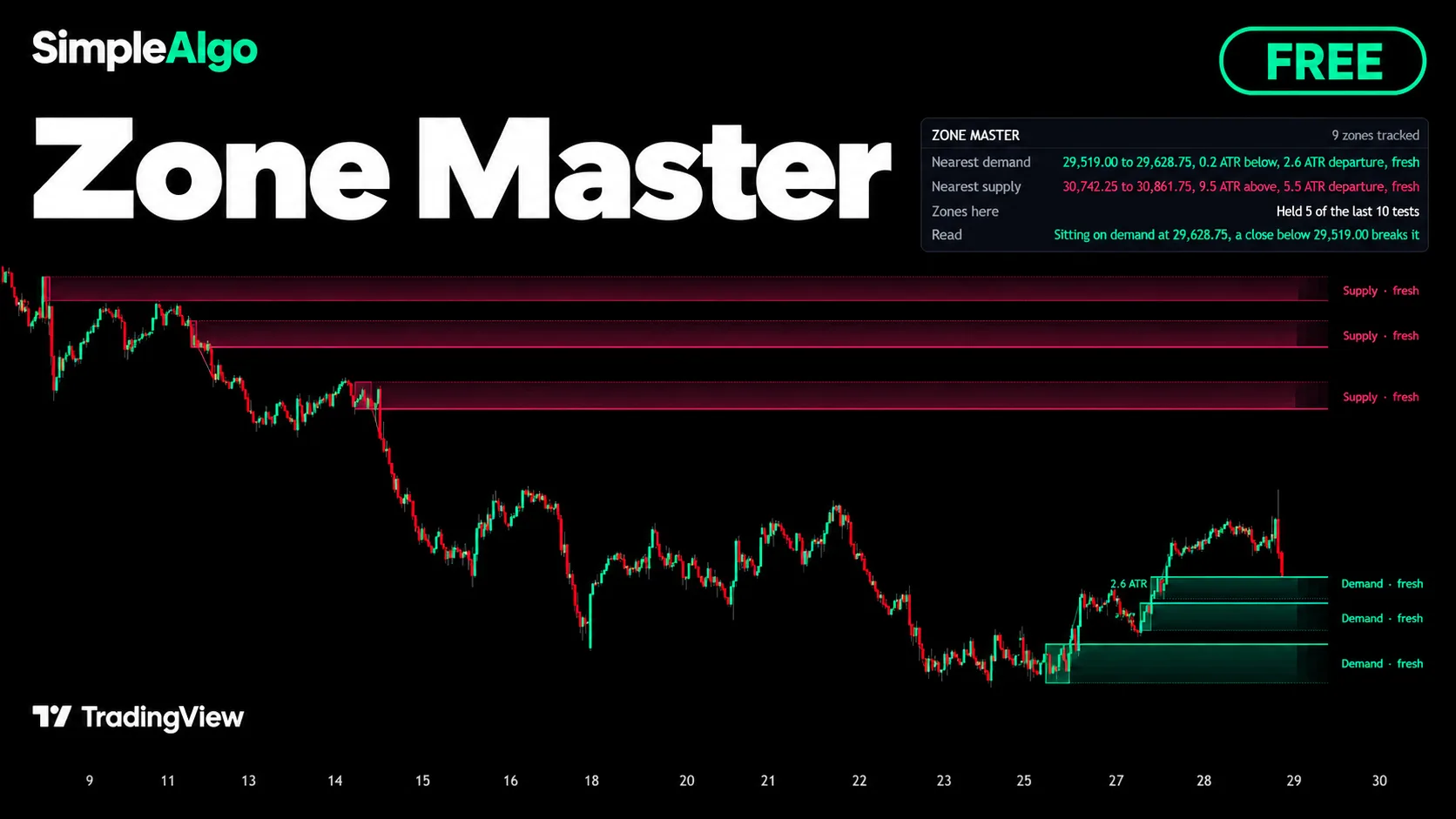
Where did price leave in a hurry, how fast did it leave, and how much of that zone is left? Zone Master draws supply and demand zones that keep track of themselves. The zones do the drawing, the panel does the words, and the alerts carry the events.
Getting started
- 1Open TradingView and click IndicatorsSearch for "Zone Master SimpleAlgo" in the Community scripts tab.
- 2Add Zone Master to your chart
- 3Keep the defaultsA base is up to 2 ATRs tall and 4 to 12 bars long, and the departure has to be at least 2.5 ATRs within 8 bars. Everything is measured in ATRs, so the defaults work on gold, crypto and stocks alike.
- 4Add alerts if you want themSet them to "Once per bar close".
What counts as a zone
A zone is the quiet base price left in a hurry. The base is a handful of bars whose whole range stays inside a couple of ATRs. The departure is a close a few ATRs away from the base's edge, within a few bars of the base ending. A slow drift away is not a departure.
A move up from a base makes a demand zone. A move down makes a supply zone. The base is where the orders that drove the move were filled, and what is left of them waits there.
How zones are tested and spent
- Price trading back into a zone spends it as far as it reached. The zone melts from the edge price meets first.
- Price leaving a zone without closing through it is a test that held.
- A close beyond the far edge, or every last bit of the zone traded through, breaks it.
- After a set number of tests (4 by default) a zone is retired, whatever is left of it.
- A zone older than the age limit (2000 bars by default) is dropped even if price never came back.
What you see on the chart
- Demand zones in mint and supply zones in pink by default. Each zone glows at its near edge and fades toward the far one.
- The part price has already traded through stays as a faint shadow.
- A solid line on the near edge (bold while the zone is fresh) and a dotted line on the far edge.
- The pad: a box over the base bars with the departure written on it, such as 2.6 ATR.
- The launch line from the pad to where the departure ended: the move that made the zone.
- A name on the right: Demand or Supply, fresh or tested so many times.
- Only the nearest few zones each side, within reach of price, are drawn. The rest are tracked but not drawn.
The panel
| Row | What it shows |
|---|---|
| Zone Master | How many zones are being tracked. |
| Nearest demand | The closest demand zone below price: its range, how far below in ATRs, its departure and whether it's fresh or tested. |
| Nearest supply | The same for the closest supply zone above price. |
| Zones here | How many of the last ten zone tests on this chart held. |
| Read | One sentence: testing a zone now, sitting on demand, pressing into supply, or which zone is the first thing in the way, and the close that would break it. |
Alerts
- New demand zone
- New supply zone
- Demand reached: price has entered a demand zone
- Supply reached: price has entered a supply zone
- Zone held: price left a zone without closing through it
- Zone broke: a close beyond the far edge ended a zone
Set alerts to Once per bar close.
Settings
| Setting | What it does |
|---|---|
| Base no taller than (ATR) | The base can be any length within the limits below, as long as its whole range stays inside this many ATRs. Default 2.0. |
| Departure of at least (ATR) | How far price has to travel from the base's edge to a close to make it a zone. Default 2.5. |
| Departure within (bars) | The departure has to happen within this many bars of the base ending. Default 8. |
| Shortest / longest base (bars) | How short and how long a base can be. Defaults 4 and 12. |
| Retire after (tests) | A zone weakens every time price comes back. After this many tests it is retired. Default 4. |
| Zones age out after (bars) | A zone this old is dropped even if price never came back. Default 2000. |
| Zones to draw, each side | The nearest zones above and below price that are drawn. Default 3. |
| Within (ATR) | Zones further from price than this are tracked but not drawn, so a far old zone does not stretch the chart. Default 20. |
| Extend right (bars) | How far zones reach past the last bar. Default 12. |
| Colours and brightness | Mint and Pink, Ice, Neon or Custom, with brightness from 1 to 5. |
| Names, Edges, Launch lines, Panel | Turn each part of the drawing on or off, and place and size the panel. |
How to read it
- 1Start with the Read rowIt tells you whether price is in a zone, sitting on one, or in open ground, and which close would break the zone in play.
- 2Fresh beats testedA fresh zone has not been touched since it was made. Every test spends some of it, which is why the label counts tests and the zone shrinks.
- 3Check the departureThe ATR number on the pad says how fast price left. A bigger departure means a more urgent move away from that base.
- 4Use the score as contextZones here shows how tests have gone on this chart lately. It describes the past, not what the next test will do.
Common questions
Yes. It's free and open source on TradingView, no membership needed.
Zones are found on closed bars only, so a zone appears once its departure bar has closed and stays where it was drawn. Zones then change only as price tests, spends or breaks them.
No. A zone shows where price left in a hurry before. Whether it holds again is never certain, which is why tests are tracked and a close through the far edge ends the zone.
Any. Everything is measured in ATRs, so the same settings mean the same thing on gold, bitcoin or a stock.