Trend Master
Trend Master answers three questions at a glance: which way is the market trending, how strong is the trend right now, and is the current dip a pullback or the start of something new. It uses one adaptive ribbon, strength-coloured candles and only two signals.
- Pullback Master (0:30): spotting pullbacks inside a trend
- RSI Master (2:51): reading momentum more clearly
- VWAP Master (4:23): where fair value sits during the session
- Trend Master (6:36): filtering out chop by trend direction
- Reversal Master (7:48): seeing when a move is stretched
Getting started
- 1Open TradingView and click IndicatorsSearch for "Trend Master SimpleAlgo" in the Community scripts tab.
- 2Add Trend Master to your chart
- 3Keep the defaultsThe defaults suit most markets. Longer lengths suit slower markets and higher timeframes.
- 4Add alerts if you want themSet them to "Once per bar close".
What you see on the chart
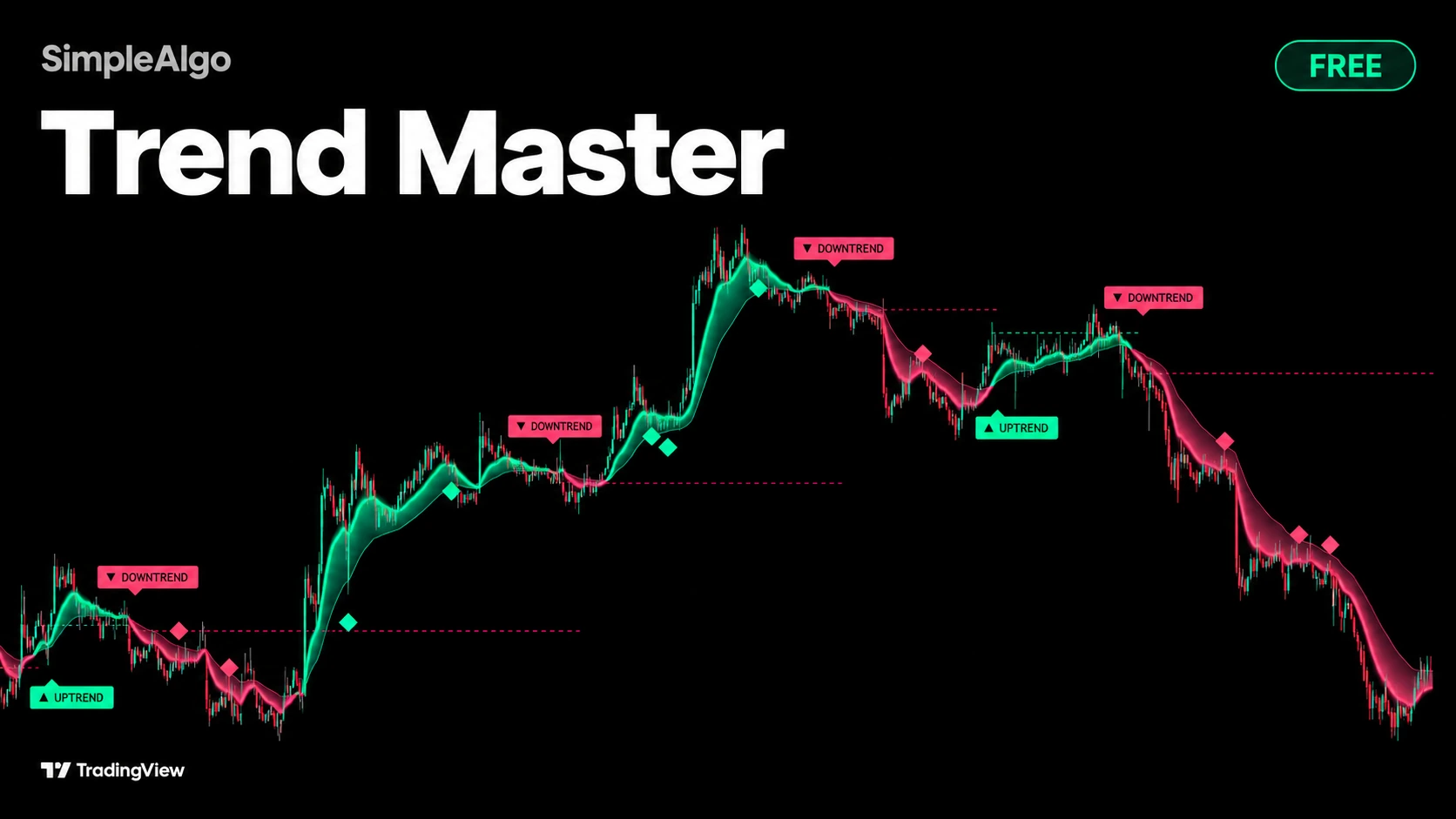
- The ribbon. Its colour is the trend direction. A wide, bright aura is a strong trend; a thin, faded one is running out of steam.
- Candles coloured by trend strength.
- UPTREND and DOWNTREND labels for confirmed changes in direction. Rare by design.
- Diamonds for finished pullbacks: price dipped into the ribbon and resumed with the trend.
- A dashed trend origin line at the price where the current trend began.
- A panel describing the state: Trending clean, Trending, Pulling back, Losing steam, Confirming... or Chop, signals paused.
How it works
Adaptive ribbon
The ribbon is a fast and a slow exponential average. Their lengths scale with an efficiency ratio: in clean, directional markets they shorten so the ribbon follows price; in choppy markets they lengthen, up to 1.6x the base, so it flips less on noise. The trend is up when the fast average is above the slow one.
Trend strength
Each bar gets a score from 0 to 1 blended from the gap between the averages (in ATR), how efficiently price is moving, and, where volume exists, whether up-volume versus down-volume over 20 bars supports the trend. It reads Strong, Steady or Weakening.
Trend start
After a cross, the new direction must survive the confirmation period (3 bars by default) with price closed on the correct side of the ribbon. Signals must alternate direction. Labels therefore appear a few bars after the cross: that's the cost of filtering out false starts.
Chop filter
If the ribbon has flipped more than the allowed number of times (2) in the recent window (50 bars), the market is treated as chop. The ribbon keeps tracking, but no signals print until it settles.
Pullback
Once a confirmed trend is at least 8 bars old, the script watches for price to reach into the ribbon by the chosen depth (40% of its width). When price closes back outside the ribbon on a candle in the trend direction, with strength at least Steady, a diamond prints.
How to use it
- Read the ribbon first: colour for direction, brightness and aura for strength.
- Trend labels mark confirmed changes in direction.
- Diamonds mark continuation: the moments trend traders typically watch for re-entries.
- While price stays on the right side of the origin line, the move that started the trend hasn't been undone.
- Too few signals in ranges? Raise the chop filter's max flips. Too many diamonds? Raise the pullback depth or spacing.
Settings
| Setting | What it does | Default |
|---|---|---|
| Fast / slow length | Base lengths of the two averages. | |
| Adapt to volatility | Scales the lengths by the efficiency ratio. | On |
| Trend start / Pullback signals | Show or hide each signal. | On |
| Confirmation bars | Bars a new trend must survive before it's signalled. | 3 |
| Chop filter window / max flips | How many flips in how many bars count as chop. | 50 / 2 |
| Pullback depth | How far into the ribbon price must reach. | 40% |
| Minimum trend age for pullbacks | Bars a trend must be before pullbacks count. | 8 |
| Spacing between pullbacks | Minimum bars between diamonds. | |
| Strength candles / Panel / Include volume | Strength colouring, the panel and its position, and volume in the strength score. | On |
| Look | Neon, Aurora, Classic, Ice or Custom themes, glow, strength aura, origin line, background flash (off) and label distances. | Neon |
Alerts
- New uptrend and New downtrend, on confirmation, with move quality in the message.
- Pullback in uptrend and Pullback in downtrend, with trend strength in the message.
Set alerts to "Once per bar close".
Common questions
Yes. It's free and open source on TradingView, no membership needed.
Signals are decided on closed bars and never move. The ribbon, candle colours, glow and aura update on the live bar like any moving average. The panel reads the last closed bar.
A new trend must survive the confirmation period first. That filters out false starts.
The chop filter is active. The panel shows Chop, signals paused until the ribbon settles.