Get Started with SimpleAlgo
Follow these quick steps to activate your indicators and access your AI Dashboard.
Setup Your TradingView Indicators
Create Your Free TradingView Account
Go to TradingView.com and make a free account. A paid plan is not needed, as our indicators are compatible with only a free plan.
Note: It may ask you to upgrade to a paid plan if you have 3 indicators on your chart already. With a free TradingView plan you can only have 3 indicators enabled at once.
Submit Your TradingView Username
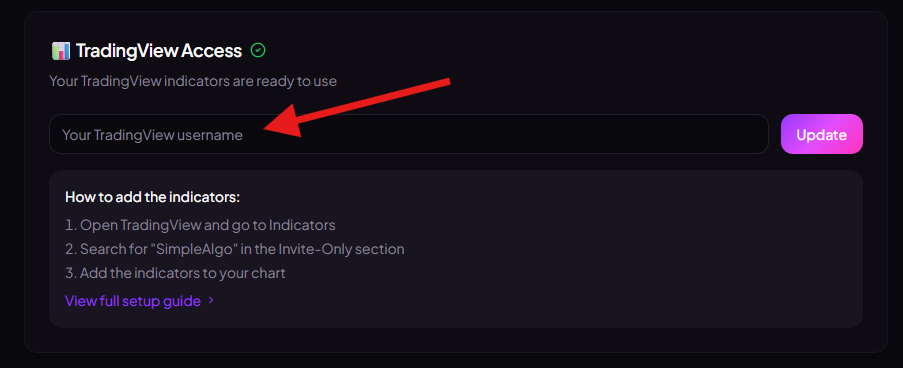
Go to the SimpleAlgo Hub at simplealgo.io/hub and input your TradingView username. Your indicator access will be granted automatically.
Add SimpleAlgo in TradingView
Once access is granted:
- Open TradingView
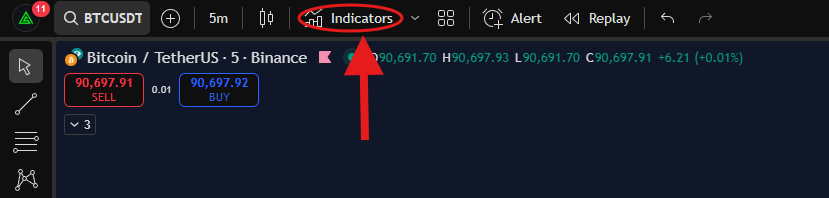
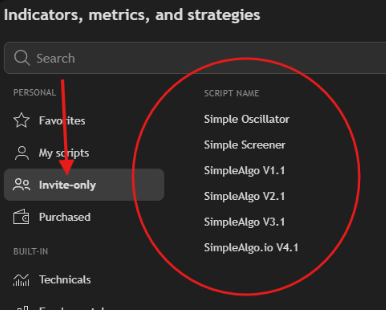
- Go to Indicators → Invite-only scripts
- Select SimpleAlgo
- Add it to your chart
Access Your AI Trading Dashboard
Unlimited access included with your SimpleAlgo subscription.
Login to SimpleAlgo Hub
Go to simplealgo.io/hub and login with Discord. This is the same Discord account linked to your membership.
Open the AI Dashboard
From the Hub, click "Open Dashboard" or go directly to ai.simplealgo.io and login with the same Discord account.
Pro Tip
Start with the default settings and Day Trader mode. As you become familiar with the indicator, you can fine-tune settings to match your specific strategy.
Troubleshooting
Can't Find SimpleAlgo in Invite-Only Scripts?
Make sure you've submitted your TradingView username through the SimpleAlgo Hub and waited 1-2 minutes for access to be granted. If the issue persists, contact support via Discord.
Indicator Not Loading?
Try refreshing your TradingView page. If the problem continues, check that your subscription is active and your TradingView username is correctly linked in the Hub.